AWS IAM Explained for DevOps Engineers 🔐☁️
Tech enthusiast | Code craftsman | DevOps explorer | Turning bugs into features one line at a time 🚀
If AWS VPC is the foundation of networking, then IAM is the foundation of security.
For a DevOps engineer, misconfigured IAM is one of the fastest ways to cause a security incident—or fail an interview.
In this blog, we’ll break down AWS IAM from a DevOps engineer’s point of view, focusing on real usage, automation, and best practices, not textbook definitions.
What Is AWS IAM?
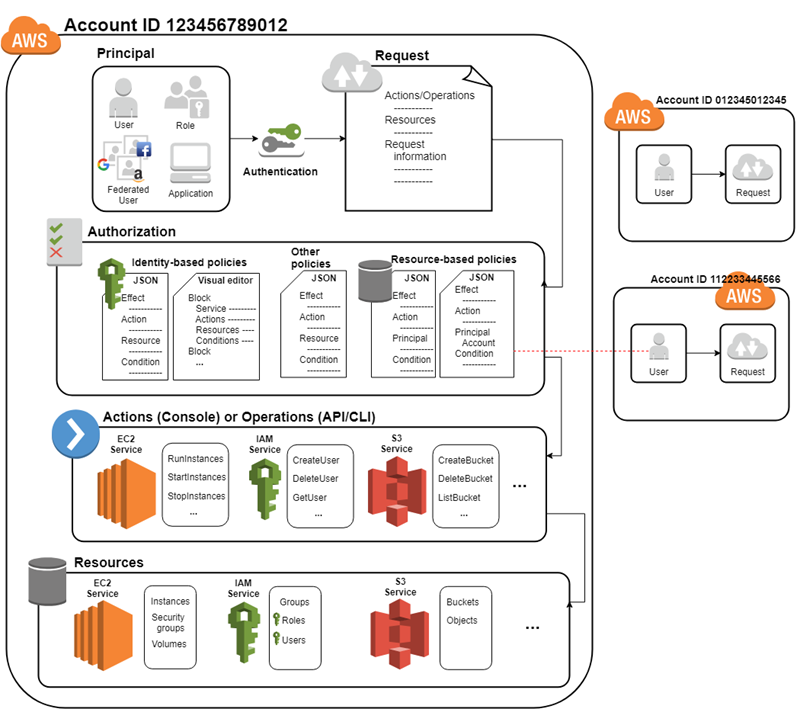
AWS IAM (Identity and Access Management) controls:
Who can access AWS
What they can access
How they can access it
IAM answers one critical DevOps question:
“Who is allowed to do what on which AWS resource?”
Why IAM Is Critical for DevOps Engineers
DevOps engineers use IAM to:
Secure CI/CD pipelines
Avoid hardcoded credentials
Automate access using roles
Enforce least-privilege security
Protect production environments
⚠️ Most cloud breaches happen due to IAM misconfiguration—not hacking.
Core IAM Components (DevOps View)
1️⃣ IAM Users
IAM Users represent humans.
Use cases:
Admins
Developers
Read-only auditors
Best practice:
❌ Don’t use root account
✅ Enable MFA
✅ Minimal permissions
👤 Humans = IAM Users (mostly).
2️⃣ IAM Groups
Groups are collections of users.
Examples:
DevOps-Team
Developers
ReadOnly-Auditors
Why DevOps engineers love groups:
Easy permission management
Centralized control
Cleaner audits
📌 Assign permissions to groups, not individual users.
3️⃣ IAM Policies (The Real Power)
Policies define permissions using JSON.
They specify:
Actions (what)
Resources (where)
Effect (allow/deny)
DevOps usage:
Allow Jenkins to deploy EC2
Allow GitHub Actions to push Docker images
Restrict delete permissions in production
📜 Policies are code → treat them like IaC.
4️⃣ IAM Roles (Most Important for DevOps)
IAM Roles are temporary identities used by services.
Common DevOps scenarios:
EC2 accessing S3
Jenkins pushing images to ECR
ECS pulling Docker images
Lambda accessing DynamoDB
💡 Golden Rule:
Services should use IAM Roles, not access keys.
IAM in CI/CD Pipelines 🔄
A secure DevOps pipeline uses IAM like this:
Jenkins EC2 → IAM Role
Role allows:
Pull from GitHub
Push to Amazon ECR
Deploy to Amazon ECS
No access keys stored in code
Result:
Secure
Auditable
Scalable
🔐 No secrets in pipelines = real DevOps maturity.
IAM Best Practices for DevOps Engineers ✅
✔ Use Least Privilege
Give only what’s required—nothing more.
✔ Use Roles Over Keys
Temporary credentials > static credentials.
✔ Enable MFA Everywhere
Especially for admin users.
✔ Separate Environments
Different IAM roles for:
Dev
Staging
Production
✔ Monitor with CloudTrail
Track who did what and when.
Common IAM Mistakes (Avoid These 🚫)
Using root account for daily work
Hardcoding AWS access keys in code
Giving
AdministratorAccessto everyoneSharing IAM users
Not rotating credentials
These mistakes can destroy production environments in minutes.
IAM + Infrastructure as Code
DevOps engineers manage IAM using:
Terraform
AWS CloudFormation
Benefits:
Version-controlled permissions
Easy rollback
Peer-reviewed security changes
Compliance-friendly audits
📜 Security as Code = DevSecOps.
Interview Questions You’ll Face 🎯
Be ready to answer:
IAM User vs Role?
Why roles are better than access keys?
How Jenkins accesses AWS securely?
How do you secure a CI/CD pipeline?
What is least privilege?
👉 IAM knowledge = interview confidence.
Real-World DevOps Example
Scenario:
Deploy Docker images from Jenkins to ECS.
IAM Flow:
Jenkins EC2 → IAM Role
Role permissions:
ECR push/pull
ECS deploy
CloudWatch logs
No passwords. No secrets. Fully automated.
🔚 Conclusion
AWS IAM is not just a security service—it’s a core DevOps enabler.
Secure automation
Safe CI/CD pipelines
Controlled access
Compliance-ready systems
If you don’t understand IAM, you don’t truly understand AWS DevOps.
Master IAM early, and everything else in AWS becomes safer and simpler.


